
Introduction: Why Order Execution Dictates Trading Survival
When beginners lose money on a trade, they almost always blame their analysis: “The chart lied to me,” or “The market reversed unexpectedly.”
Yet, in countless cases, the loss was not caused by incorrect directional bias, but by poor execution mechanics.
Clicking the wrong order button or relying on default broker settings can cause you to:
- Buy at the absolute worst peak price during a fast momentum spike (Slippage).
- Fail to get filled while watching a stock take off without you.
- Discover that your protection order failed to trigger during a gap down.
An order is not simply a generic “buy” or “sell” command. It is a precise legal contract instructing the exchange how, when, and at what price your capital may be committed.
This guide breaks down every essential order type, explains the exact mechanics behind them, and shows you how to structure your execution like a professional.
1. Market Orders: Immediate Execution at Any Price
How It Works
A Market Order is an instruction to buy or sell a security immediately at the best available current price in the order book.
- Priority: Execution speed is guaranteed; execution price is not.
- Order Book Interaction: You are “taking liquidity” by crossing the bid-ask spread and matching against existing passive limit orders.
The Hidden Danger: Slippage
In calm markets with massive volume (e.g., Apple or Microsoft during midday), a market order will fill within pennies of the quoted price.
However, during market opens, earnings announcements, breaking macroeconomic news, or in smaller-cap stocks, the order book thins out. A market order will sweep through available prices until filled. You might press “Buy” at $50.00 and receive a fill at $52.50 — instantly starting your trade in a 5% hole.
- Golden Rule: Never use Market Orders on illiquid stocks, penny stocks, options, or during high-volatility market open spikes (the first 15 minutes of trading).
2. Limit Orders: Guaranteed Price, Uncertain Execution
How It Works
A Limit Order sets the maximum price you are willing to pay as a buyer, or the minimum price you are willing to accept as a seller.
- Buy Limit: Placed at or below the current market price. It executes only at your limit price or better (lower).
- Sell Limit (Take-Profit): Placed at or above the current market price. It executes only at your limit price or better (higher).
- Priority: Price is strictly guaranteed; execution is not.
When to Use Limit Orders
Limit orders are the cornerstone of patient, disciplined trading. They allow you to define key support or resistance levels on your chart, place your order in advance, and let the market come to you without watching the screen every second.
- Trade-off: If the stock rallies just one cent before touching your buy limit, your order remains unfilled, and you miss the move. This is known as “opportunity risk” — a far safer risk than catastrophic slippage.
3. Stop Orders: Your Non-Negotiable Safety Net
A Stop Order is dormant until the market trades at or through a specified price level (the “Stop Price”). Once touched, the order activates.
Stop-Loss (Stop-Market)
- Purpose: Protecting capital by cutting losses automatically when an invalidation point is breached.
- Mechanism: You buy a stock at $100 and set a Stop-Loss at $95. If the stock drops to $95, your order instantly converts into a Market Order to sell.
- Advantage: Guaranteed exit. You will definitely get out of the position.
- Risk (Gapping): If the company announces bad news overnight and opens at $90, your stop triggers at market open and sells at $90 — not $95.
Stop-Limit Orders
- Mechanism: Sets two prices: a Stop trigger price and a Limit execution price.
- Example: Stop at $95, Limit at $94. If the price hits $95, a limit order to sell at $94 or higher is activated.
- Danger: If the price gaps violently through $94 (e.g., opens at $91), your limit order will NOT execute. You remain trapped in a plunging position. For capital preservation, standard Stop-Loss orders are preferred over Stop-Limit orders for defensive risk exits.
4. Advanced Order Types for Risk Automation
Trailing Stop Orders
A Trailing Stop automatically adjusts your exit level upwards as the market price moves in your favor, locking in unrealized gains while maintaining downside protection.
- Can be defined by a fixed dollar amount (e.g., $2.00 trail) or percentage (e.g., 5% trail).
- If the stock price rises, the stop rises with it. If the stock price drops, the stop remains stationary.
OCO (One-Cancels-the-Other) / Bracket Orders
A bracket order wraps around your entry with both an automated profit target and a stop loss:
- Leg 1: Buy 50 shares at $100 (Limit).
- Leg 2 (Profit Target): Sell Limit at $110.
- Leg 3 (Stop-Loss): Sell Stop at $95.
If the stock reaches $110, you bank your profit, and the stop-loss order is automatically canceled. If the stock drops to $95, you exit with a planned 5% loss, and the profit order is wiped. This completely eliminates the emotional temptation to move stop-losses mid-trade.
Order Type Comparison Cheat Sheet
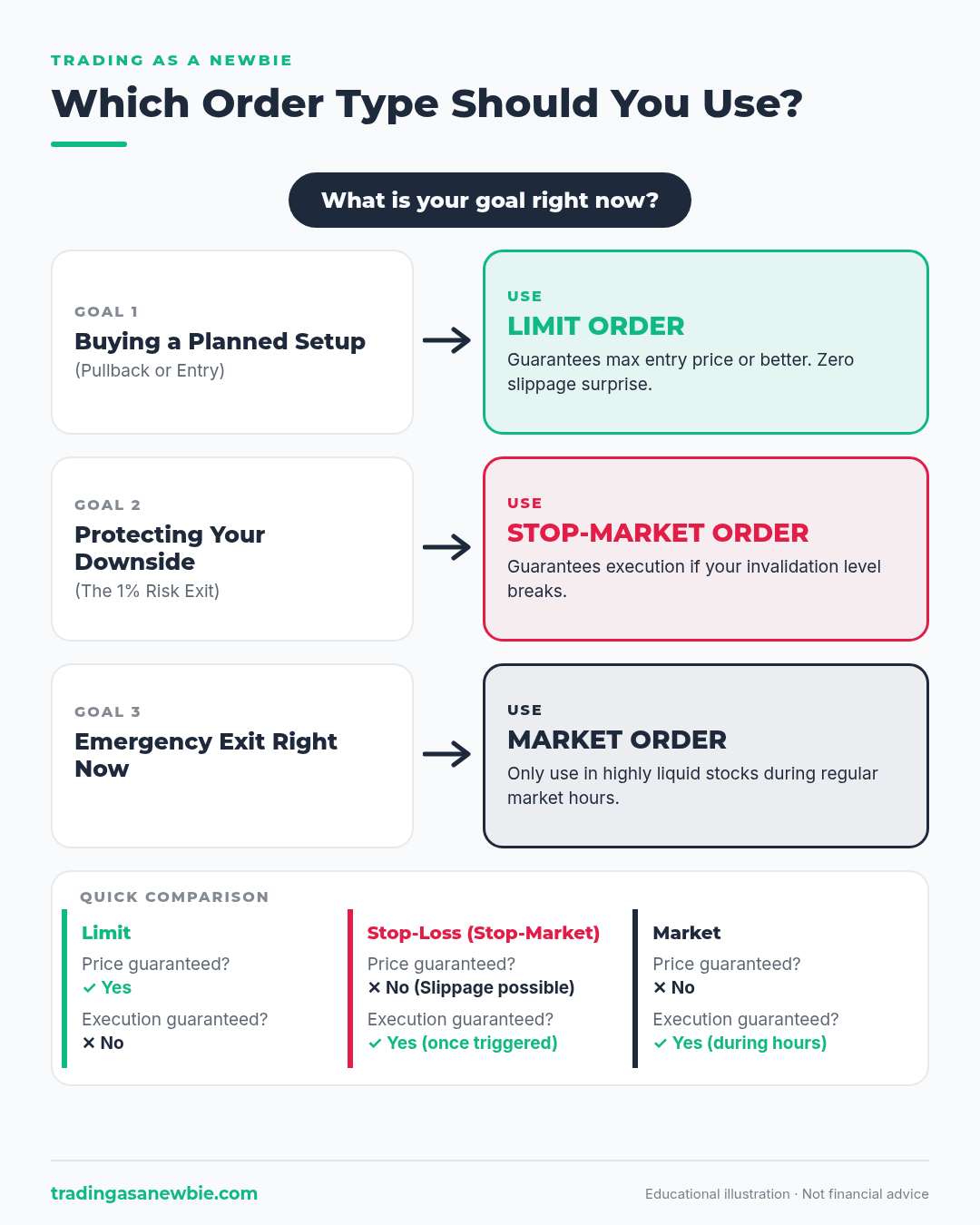
| Order Type | Price Guaranteed? | Execution Guaranteed? | Primary Purpose | Best Used When… |
|---|---|---|---|---|
| Market | No | Yes (during hours) | Instant fill | Highly liquid large caps in urgent exits |
| Limit | Yes | No | Controlled entry / Profit target | Entering planned support zones calmly |
| Stop-Loss | No (Slippage possible) | Yes (once triggered) | Downside protection | Invalidation point on every single trade |
| Stop-Limit | Yes | No (Risk of no fill) | Controlled breakout entry | Entering clean momentum breakouts |
| Trailing Stop | No | Yes (once triggered) | Profit locking | Riding strong multi-day trend moves |
| Bracket (OCO) | Mixed | Automated | Hands-off risk management | Full trade execution without screen watching |
4-Step Checklist for Placing an Order
- Verify Order Type: Is your ticket set to Limit or Stop rather than the default Market?
- Double-Check Quantity: Ensure your share count is calculated from your 1% risk rule, not an arbitrary dollar round number.
- Confirm Duration: Is the order set to Day (cancels at 4:00 PM close) or GTC (Good ‘Til Canceled)?
- Attach Stop-Loss Before Submission: Never open a trade with the intention of “adding the stop later.”
Frequently Asked Questions (FAQ)
Always use a Limit Order when entering a planned swing trade. A Limit Order guarantees that you will pay your exact target price or better, protecting you from unexpected price slippage during volatile market opens.
In a sharp market sell-off or an overnight earnings gap down, a stock’s price can jump straight past your limit price without filling your order. For defensive downside protection, always use a Stop-Market Order so your exit is guaranteed once your invalidation level is breached.
A Bracket Order (One-Cancels-the-Other) automatically attaches both your defensive Stop-Loss order and your profit-taking Limit Order to your position at the same time. If either order is triggered, the broker automatically cancels the other one.
Risk Disclaimer: Trading financial assets involves substantial risk of loss and is not suitable for every investor. The content on tradingasanewbie.com is published strictly for educational and informational purposes and does not constitute financial, investment, or trading advice. Never risk capital you cannot afford to lose.